
Rotating mobile proxies route your traffic through IP addresses assigned to real 4G and 5G devices on carrier networks, swapping that address on a schedule or trigger you control. If your work involves scraping sites that fight back, verifying ads across carriers, or running QA on mobile-first apps, this is usually the right tool. If you're pulling static data from sites with weak bot defenses, you're overpaying for infrastructure you don't need.
The core trade-off is simple:
- Advantages: carrier-level trust that lowers block rates, IP pools that mirror what actual phone users see, and rotation that keeps long scraping jobs from getting fingerprinted.
- Limitations: higher per-GB cost than datacenter or even residential proxies, and rotation timed wrong can snap a session mid-task if you're not using sticky mode.
The gap that matters: carrier-issued IPs sit behind Carrier-Grade NAT, meaning thousands of real subscribers share the same public address. Anti-bot systems that block too aggressively risk locking out real customers, so they tend to treat mobile ranges with more caution than datacenter ranges. That's the entire economic case for paying more.
Key Takeaways
Rotating mobile proxies succeed when rotation settings match the task's risk profile, and providers earn trust through documentation, trials, and transparent pricing rather than pool-size claims alone.
| Point | Details |
|---|---|
| Match rotation to task | Use time or request-based rotation for scraping, sticky sessions for logins and transactions. |
| Verify carrier and city targeting | Confirm targeting granularity before buying if ad verification or localized QA is the goal. |
| Watch bandwidth drivers | Rotation frequency and request patterns affect GB usage more than most buyers expect. |
| Test before you commit | Run a geo check, ad spot-check, and warm-up simulation during any trial period. |
| NullVault fits fast-turnaround buyers | Offers automatic credential provisioning in a matter of seconds, prepaid billing, and city-level mobile targeting with no identity checks. |
Table of Contents
- How Rotating Mobile Proxies Actually Work
- Where Rotating Mobile Proxies Actually Pay Off
- What Technical Specs Should You Check Before Buying?
- How Much Do Rotating Mobile Proxies Cost?
- How Should You Choose a Rotating Mobile Proxy Provider?
- How NullVault Fits the Buyer Checklist
- Our Take on Buying Rotating Mobile Proxies
- Try Rotating Mobile Proxies Without the Signup Hassle
- Sources
How Rotating Mobile Proxies Actually Work
Every rotating mobile proxy traces back to a physical or virtualized SIM sitting on a carrier's network. A gateway (often a bank of Android devices or LTE modems) holds the SIM, connects to the mobile network, and hands off the resulting IP to the proxy provider's routing layer. Your request enters that layer, gets mapped to an active SIM session, and exits looking exactly like traffic from someone's phone because it is.
The provider's IP pool is really a pool of active carrier sessions. When a carrier reassigns an IP to a different subscriber, or when the provider rotates a SIM out of use, the proxy pool reflects that change. This is why mobile IP pools feel more "alive" than datacenter pools; they're tied to real subscriber churn.
Rotation itself gets triggered a few different ways:
- Time-based rotation swaps the IP automatically every few minutes, useful for high-volume scraping where you don't need continuity.
- Request-count rotation changes the IP after a set number of requests, giving you predictable churn for pagination-heavy jobs.
- API-driven rotation lets your script call for a new IP on demand, which matters when you detect a block mid-run and want to recover instantly.
- Modem or session reset forces a hard IP change at the gateway level, typically used when a specific IP gets flagged and needs to be pulled from rotation entirely.
Sticky sessions solve the opposite problem. Logins, checkout flows, and multi-step forms break if your IP changes between requests, so providers let you pin a session to one IP for a set window, often 10 to 30 minutes before it rotates naturally. Rotation control is arguably the single most important feature to check before buying because it's what lets you match identity churn to how risky your task actually is. Compare that against a rotating vs. sticky proxy setup before committing to a plan.
Pro Tip: Run your first test with sticky sessions on, even for scraping. If your scraper still gets flagged with a pinned IP, the problem is your request pattern, not your proxy.
Where Rotating Mobile Proxies Actually Pay Off
Not every job needs carrier-grade IPs. Here's where the extra cost earns its keep.
- Web scraping at scale: Sites with aggressive fingerprinting throw fewer captchas and blocks at mobile ranges than at datacenter ranges, because carrier NAT makes blunt blocking risky for the site's own real users. Set rotation on a request-count trigger, rotating every 20 to 50 requests depending on the target's sensitivity.
- Ad verification: You need to see the exact ad a real subscriber on a specific carrier, in a specific city, actually gets served. Mobile IPs reproduce that carrier-and-location combination closely, which datacenter IPs simply can't fake. Use time-based rotation here, cycling every few minutes to sample different ad slots.
- Mobile QA and app testing: Apps behave differently on real carrier connections than on emulators or Wi-Fi tunnels, especially around latency-sensitive features and carrier-billing flows. Sticky sessions matter most here since a test run shouldn't change identity mid-flow.
- Social media and multi-account management: Platforms watch for IP churn that doesn't match human behavior. Mobile proxies with long sticky windows, paired with slow warm-up (light activity for the first few days on a new account), mimic a real phone user far better than a fresh datacenter IP ever will. See our social media proxy guidance for warm-up pacing specifics.
Sticky sessions generally suit login and transaction-heavy flows, while rotating identities work better for distributed scraping and verification jobs where each request benefits from looking like a different person entirely, a distinction backed by how providers structure their mobile proxy tiers. Get the rotation cadence wrong for the use case and you'll either burn IPs too fast or leave sessions vulnerable to detection.
What Technical Specs Should You Check Before Buying?
Marketing pages love to lead with pool size. Pool size matters, but only alongside a handful of other specs that actually determine whether the proxy works for your stack.
Pool size and geographic diversity. A pool of 500,000 mobile IPs spread across ten countries is less useful than 100,000 IPs concentrated in the three cities you actually need. Ask for the breakdown, not the headline number.
Carrier and city-level targeting. For ad verification and localized QA, country-level targeting isn't enough. You need to specify carrier (say, a specific national carrier) and ideally city, since ad inventory and app behavior both vary at that resolution.
Protocol support. Confirm HTTP(S) and SOCKS5 support explicitly; SOCKS5 matters if your stack needs raw TCP tunneling rather than HTTP-layer proxying. Compare HTTP against SOCKS5 if you're unsure which your tooling expects.
Credential provisioning. Some providers still run identity checks and manual approval before issuing credentials, which can cost you days. Look for automatic provisioning that hands you working credentials in seconds, not a support ticket queue.

APIs and SDKs. Rotation control, session pinning, and usage monitoring should all be scriptable. Providers that publish language-specific SDKs and code samples cut your integration time from days to hours.
Performance metrics. Latency, uptime, and throughput numbers should be stated plainly in documentation, not buried in a sales call.
| Spec | What to look for |
|---|---|
| Pool size | Total IPs plus breakdown by country/city, not just a headline figure |
| Targeting granularity | Country, state, city, and carrier-level options |
| Protocols | HTTP, HTTPS, and SOCKS5 support confirmed in docs |
| Credential provisioning | Automated issuance, ideally under a minute, no manual review |
| API/SDK availability | Documented endpoints plus at least one language SDK |
- Test latency yourself before signing anything; a provider's stated average means little if your target sites sit on a different continent than their nearest gateway.
- Ask specifically how uptime is measured (per-IP or per-pool), since a "99.9% uptime" claim on the whole pool can still mean individual IPs drop constantly.
Compare this checklist against how residential, datacenter, and mobile proxies differ structurally, since some of these specs (like protocol support) carry over across proxy types while others (like carrier targeting) are mobile-specific.
How Much Do Rotating Mobile Proxies Cost?
Pricing generally falls into three shapes: per-GB bandwidth billing, per-port billing (you pay for a fixed number of concurrent proxy connections), and hybrid models that blend both. Mobile proxies run more expensive than datacenter proxies on a per-GB basis, a gap that reflects the scarcity of real mobile IP inventory compared to datacenter IPs, which providers can provision almost infinitely.
Shared mobile IPs cost less but come with noisier neighbors, since other customers are rotating through the same pool. Dedicated mobile IPs cost more but give you a consistent identity you're not sharing, which matters for account management tasks where consistency itself is the point.
Four things drive your actual GB usage up or down:
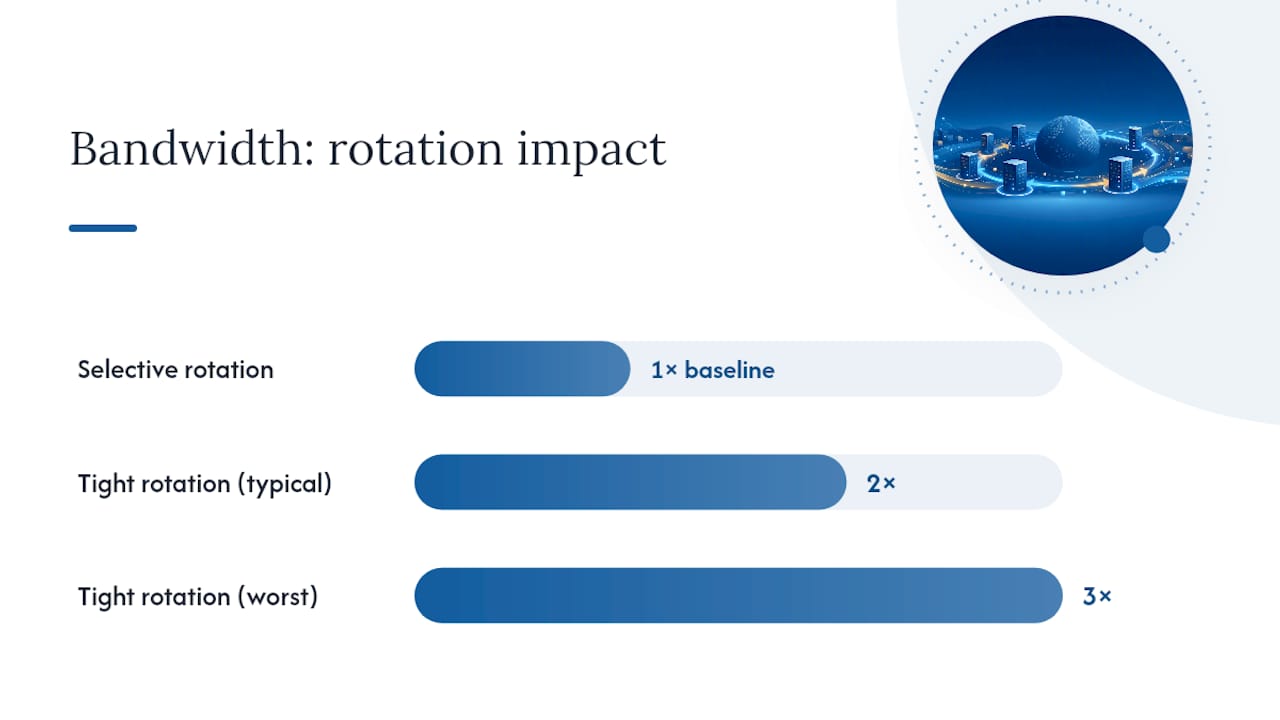
- Rotation frequency. Faster rotation means more overhead per session, since re-establishing a TLS handshake on every rotation adds bandwidth beyond the actual payload.
- Request pattern. Scraping pages with heavy images and scripts burns bandwidth fast; targeting an API endpoint that returns lean JSON burns almost nothing.
- Session pinning for heavy flows. If a task involves downloading large payloads, pin the session instead of rotating mid-download, since a dropped connection means re-downloading from scratch.
- Batching and selective rotation. Group lightweight requests together under one sticky session and reserve rotation for the specific requests that actually need a fresh identity, rather than rotating everything on a blanket timer.
The number that catches people off guard: teams that rotate on a tight timer for every single request, including retries, routinely burn two or three times the bandwidth of teams using selective rotation on the exact same job. That's not a provider markup problem; it's a request-pattern problem you control entirely on your end.
How Should You Choose a Rotating Mobile Proxy Provider?
Before you commit money, insist on a few concrete things.
- A trial token or test credential, so you can run real traffic before any commitment.
- Sample endpoints in the documentation showing exactly how a rotation request or session-pin request looks.
- Published API docs, not a promise that "the team will send you docs after signup."
- Transparent, itemized pricing that separates bandwidth, port fees, and any add-ons, rather than one bundled number.
Red flags are just as telling as the checklist itself. No trial offer at all is the biggest one; a provider confident in their pool doesn't mind you testing it first. Missing or vague documentation is another, since it usually means the API is either thin or unstable. Opaque IP sourcing, where a provider won't say whether IPs come from real carrier SIMs or from other apps' SDKs embedded in unrelated software, should end the conversation immediately.
Review-platform data consistently shows that documentation quality, trial availability, and support responsiveness predict buyer satisfaction better than pool-size claims alone.
Run this test script during any trial:
- Geo check against an IP-lookup service to confirm the city and carrier match what was promised.
- Ad verification spot-check by loading a known ad-serving page and comparing what you see against what a local user reports seeing.
- Multi-account warm-up simulation to measure how long sessions survive before triggering a platform's flag.
Pro Tip: Run the geo check first thing. If the reported city is wrong on a free trial, don't bother testing anything else. That's the whole relationship failing at step one.
How NullVault Fits the Buyer Checklist
NullVault was built around the friction points that slow technical buyers down. Credentials provision automatically in under five seconds, no identity documents, no manual review queue, just an email address and a prepaid crypto top-up. For a freelance developer trying to validate a scraper before a client deadline, that turnaround is the difference between testing today and waiting on a support ticket.
The platform covers 4G and 5G mobile IPs alongside residential, datacenter, ISP, and IPv6 pools, with rotating and sticky session control built into every plan and targeting down to country, state, and city level. Protocol support spans HTTP, HTTPS, and SOCKS5, so integration doesn't depend on retooling your existing stack.
What matters most for the checklist above:
- Prepaid billing means no contract lock-in, no minimum term you have to justify to a finance department.
- Session control lets you pin for logins and rotate for scraping from the same account, without switching plans.
- Geographic targeting down to the city level supports ad verification and localized QA work directly.
Low-friction, prepaid provisioning without identity checks removes the single biggest delay technical teams face when trying to validate a proxy provider before committing real budget.
Start with the mobile proxy product page to see current pool coverage, then run the geo check and ad-verification tests outlined above before scaling spend.
Our Take on Buying Rotating Mobile Proxies
Most buying guides treat pool size as the headline metric, and that's backward. A provider with a smaller, well-documented pool and a working API for rotation control will outperform a massive, opaque pool every time, because the thing that actually breaks scraping jobs isn't a shortage of IPs. It's mismatched rotation settings and providers who can't tell you where their IPs actually come from.
The conventional advice to "just buy the biggest pool you can afford" ignores that most tasks fail on session mismanagement, not IP scarcity. A team running sticky sessions where they should be rotating, or rotating where they should be pinning, will burn through a huge pool just as fast as a small one.
Prioritize documentation and trial access first, pool size second. Run the geo check and warm-up simulation before you commit a dollar past your trial. The providers worth paying for will let you do exactly that without friction, and the ones that won't are telling you something about what happens after you've already paid.
— NullVault
Try Rotating Mobile Proxies Without the Signup Hassle
NullVault gets you from signup to a working proxy credential in under five seconds, with no identity verification and no subscription, just prepaid crypto funds you spend as you use them.
If you're ready to test rotation settings against your own targets, start with the mobile proxy plans for carrier and city-level targeting, or check the ISP proxy options if you need residential-style trust with faster throughput. For ad verification specifically, the ad verification proxy setup walks through carrier-and-city targeting for spot-checking creative delivery.
Create an account, top up with a prepaid balance, and run the same geo check and warm-up simulation covered above before you scale spend. There's no minimum term standing between you and a real test.
Sources
- 7 Best Mobile Proxy Services in 2026 for Scraping, Automation & Ads | AdsPower
- Oxylabs reviews on G2
- oxylabs/oxylabs-sdk-python